Latest
Oct 27 · 42.22 pre-release: ladders and crowbar break-insOct 23 · First-person mods are not officially supportedOct 21 · The Indie Stone on Java mods: download responsiblySep 28 · Build 42.21 Stable: zombie duplication fixesAug 26 · Security fixes on every branchAug 17 · Servers now handle up to 254 playersJul 29 · Build 42 goes Stable

System requirements, performance and save files

This page covers what the game needs to run, the settings that help when it runs badly, where your saves and logs are kept, and how to back them up before a patch. Updated for Build 42.21 Stable and 42.22 Pre-Release, November 2026.

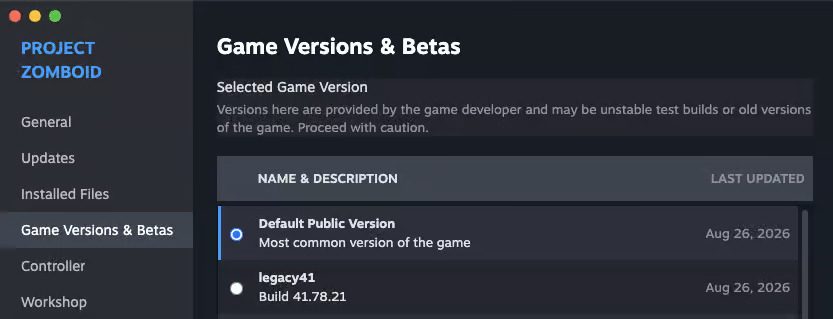
Steam Game Versions and Betas window
The Game Versions and Betas window in Steam is where you switch branches. · Official image, The Indie Stone
01Part

System requirements

The Steam store page lists one set per system, with no separate "recommended" tier:

SystemRequirements
WindowsWindows 10 or 11 (64-bit), 2.77 GHz quad-core Intel processor, 8 GB RAM, dedicated graphics card with 4 GB of video memory and OpenGL 2.1, 10 GB of storage
macOS10.15 or later, Intel or Apple silicon, 8 GB RAM, 10 GB of storage. Nvidia cards are listed as not compatible
Linux64-bit Ubuntu 16.04 LTS or later, otherwise the same as Windows

An August 2026 reading of the same page showed 2 GB of video memory and 5 GB of storage, so the listing has gone up; we found no official post about the change. Community guides suggest 16 GB of RAM and an SSD for comfortable Build 42 play. For Linux and Steam Deck detail see Project Zomboid on Linux.

02Part

Give the game more memory

  1. Open the game folder (in Steam: right-click the game, Manage, Browse local files).
  2. Open ProjectZomboid64.json in a text editor.
  3. In the vmArgs list, change the -Xmx value. The Windows default is about 2 GB; 4 to 8 GB suits a PC with 16 GB or more.
  4. Save and start the game.

Never set it to all of your RAM. A Steam update can overwrite the file, so check it after patches. On macOS the setting is in Info.plist under JVMOptions. The launch option -safemode is for weak graphics cards.

03Part

Settings that raise FPS

In the display options:

  • Zoom out less.
  • Lower Lighting Quality.
  • Turn off corpse shadows and reduce blood.
  • Turn off 3D ground objects.
  • Turn Texture Compression on if you have 4 GB of video memory or less.
  • Leave multi-core rendering on, and cap the frame rate.

In sandbox settings, lower the zombie Population and Peak multipliers and make corpses disappear sooner. Build 42.22 fixed the Zombie Count Before Deletion option. On a Steam Deck one guide suggests 1280 x 800, 90% zoom, texture compression on and low shadows (one source).

04Part

Where your files are

WhatWhere
Everything (Windows)%UserProfile%\Zomboid
Everything (macOS and Linux)~/Zomboid
WorldsZomboid/Saves/<mode>/<save name>
Current logZomboid/console.txt
Older logsZomboid/Logs
Local modsZomboid/mods
Workshop mods<Steam library>/steamapps/workshop/content/108600
Server filesZomboid/Server

One wiki gives the Linux folder as ~/.local/share/Zomboid; the other sources say ~/Zomboid, so look there first. The launch option -cachedir= moves the whole folder somewhere else.

05Part

Backing up, and Steam Cloud

  1. Quit the game completely.
  2. Copy the Saves folder (and Server if you host) to another drive.
  3. Put the date in the copy's name.

Quitting or sleeping in game does not create a restore point, so a copy is your only way back. Do not count on Steam Cloud: the store page does not list it and SteamDB shows none set up, although one Steam Deck guide claims saves sync.

06Part

Save compatibility and Steam branches

  • Build 41 saves do not load in Build 42.
  • Unstable 42.19 saves do not load in 42.20.
  • 42.21 saves should carry into 42.22, but may not load again on 42.21 afterwards (one source). Back up first.

To switch version, right-click the game in Steam, open Properties, then Game Versions and Betas:

BranchWhat it is
None (default)Stable 42.21
legacy41Build 41.78
42.19For old Unstable saves
pre-release42.22, replacing the old unstable branch (one source)

See patch notes for what each version changed.

07Part

Quick answers

What are the system requirements for Project Zomboid?

On Windows: 64-bit Windows 10 or 11, a 2.77 GHz quad-core processor, 8 GB RAM, a graphics card with 4 GB of video memory and 10 GB of storage.

How do I give Project Zomboid more RAM?

Edit the -Xmx value in the vmArgs list of ProjectZomboid64.json in the game folder. 4 to 8 GB suits a PC with 16 GB or more.

Where are Project Zomboid save files?

In the Zomboid folder in your user folder on Windows, or ~/Zomboid on macOS and Linux, under Saves, then the game mode, then the save name.

Does Project Zomboid have Steam Cloud saves?

The store page does not list Steam Cloud, so back up the Saves folder yourself.

Do Build 41 saves work in Build 42?

No. Build 41 saves do not load in Build 42. The legacy41 branch in Steam keeps Build 41 playable.

Requirements are as the Steam store page listed them in November 2026. Sources: Steam store page · PZFans: allocate more RAM · PZFans: back up your game · Tier1Settings low FPS fixes · The Indie Stone: Build 42 checklist · SteamDB cloud settings. Your game is the final word: if it disagrees with us, tell us and we will fix the page.